Security
NATS security rests on three independent pillars: authentication, authorization, and encryption. For each of these, NATS provides flexible options to fit a wide range of use cases, from simple development environments to complex production deployments.
For a runnable, step-by-step treatment, see the Security deep dive.
Accounts and Users
NATS is multi-tenant by design. Each NATS user belongs to an account — a self-contained tenant with its own isolated subject space, users, and permissions. Multiple tenants can share a single NATS deployment without ever seeing each other's traffic. Unrelated tenants can use the same subject names without any risk of collision.
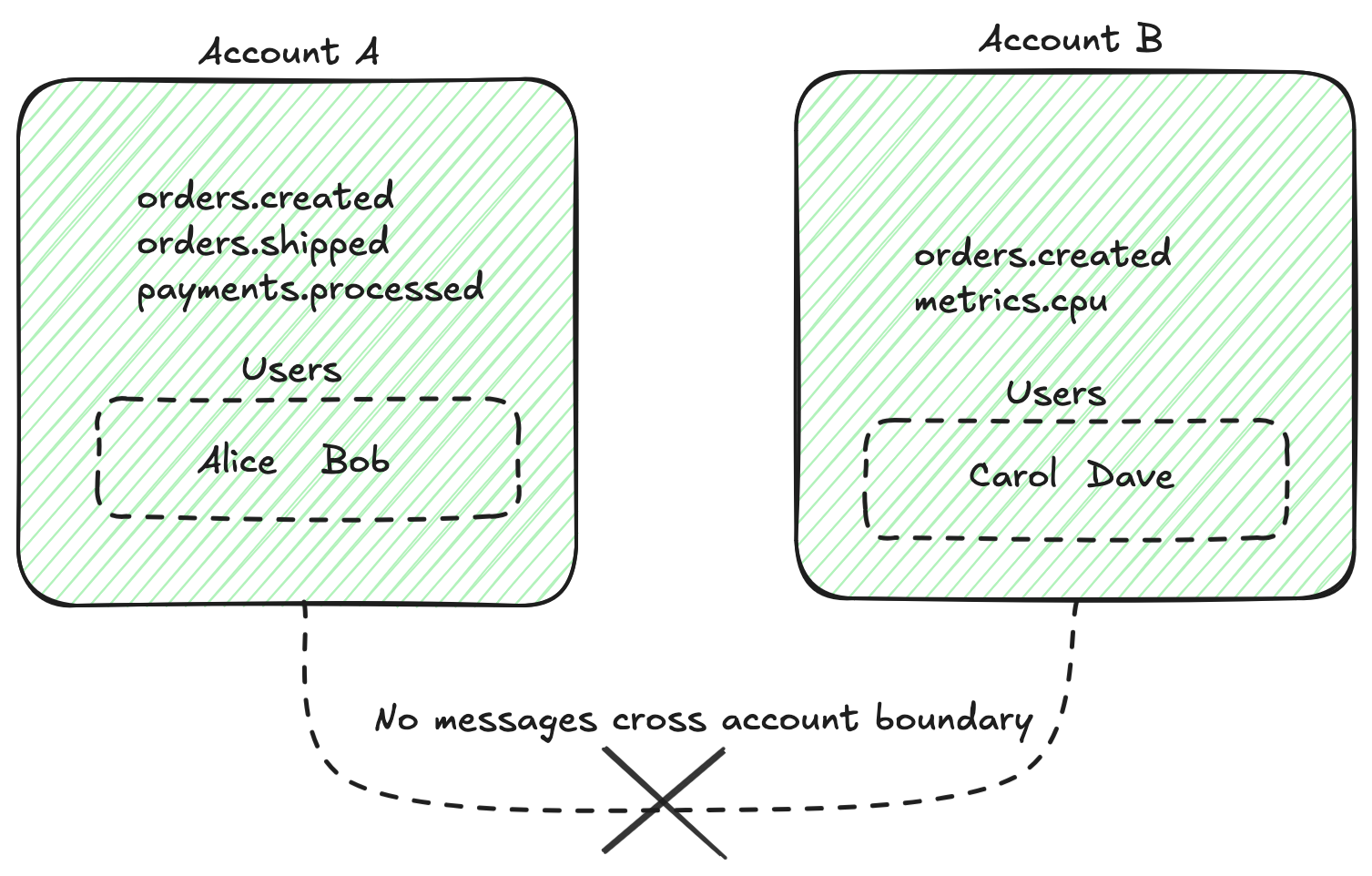
Cross-account communication is possible but requires explicit configuration.
Authentication
Authentication verifies the identity of clients connecting to the NATS server. NATS doesn't require it by default, so production deployments should always configure one of the three methods below:
- Config-based authentication: Define accounts, users, and credentials directly in the server configuration file. This is the simplest option for development and smaller deployments. There are several supported credential types, including username/password, token authentication, NKeys, and TLS client certificates.
- Decentralized authentication (operator mode): NATS uses a hierarchical trust chain — an operator signs accounts, and each account signs its own users. Credentials are JWTs signed with NKey (Ed25519) keypairs. The server only needs to trust the operator's public key — everything else verifies cryptographically, with no server-side user list. Because accounts can issue and revoke their own users independently, operator mode scales naturally to multi-tenant or large deployments where centralized credential management isn't practical. You choose a resolver model, for the server to locate account information.
- Auth callouts: Delegate the authentication decision to an application-defined NATS service that returns a signed JWT. This is useful for advanced setups, like integrating with external identity providers (e.g., OIDC, LDAP) or implementing custom authentication logic.
Authorization
Authorization controls what authenticated clients are allowed to do. NATS uses a permissions model based on subjects. You can specify which subjects a user can publish to, subscribe to, or both. Permissions support the same wildcards as subjects themselves.
Permissions are defined per user — either on the user in the server configuration, or embedded in the user's JWT. This allows for fine-grained access control, enabling you to restrict clients to only the subjects they need to interact with.
A permissions block looks like this in the server config file:
permissions: {
  publish: ["orders.>", "users.signup"]
  subscribe: {
    allow: "events.>"
    deny: "events.audit.>"
  }
}
In this example, the user can publish to subjects under orders.> or exactly
users.signup — anything else is denied, because the presence of an allow list
closes off the rest. On the subscribe side, the user can read anything under
events.>, except subjects under events.audit.>, since deny takes precedence
over allow.
Encryption
NATS encrypts data in transit with TLS. Each connection type in a NATS deployment can be secured independently:
- Client ↔ server — the connection between applications and NATS servers.
- Server ↔ server (cluster) — the routes that exchange messages between servers within a single cluster.
- Leaf nodes — connections from edge or downstream NATS servers to a parent cluster.
- Gateways — the connections between clusters in a super-cluster topology.
Each connection type has its own TLS configuration, with support for certificate
pinning, CA certificate pools, custom cipher suites, and mutual TLS
(mTLS). mTLS proves the client holds a certificate signed by a trusted
CA. Add the verify_and_map setting and the server maps the
certificate's identity (its SAN or DN) to a configured user, tying the
encryption layer into the authentication model.
Encryption at Rest
Beyond in-transit encryption, JetStream streams can be encrypted on disk using AES or ChaCha20-Poly1305 ciphers. This protects message data persisted to disk against attackers with filesystem or physical access to the server. See JetStream encryption at rest for configuration.
Try It Yourself
Save the following as nats.conf:
accounts {
    ORDERS {
        users [
            {
              user: alice, password: "s3cret",
              permissions: { publish: "orders.>", subscribe: "_INBOX.>" }
            }
        ]
    }
}
Start a server with this config:
nats-server -c nats.conf
Now try publishing a message — you'll see permissions in action:
# works — alice can publish to orders.>
nats pub --user alice --password s3cret orders.created "hello"

# fails — alice has no publish permission for billing.*
nats pub --user alice --password s3cret billing.invoice "nope"
Next steps
- Security deep dive — secure a deployment end to end
- Encryption & TLS — secure connections in transit
- Operator mode — decentralized JWT-based auth
- Subjects — the addressing system permissions are built on